第06章:结构化输出(Structured Output)
讲师:尚硅谷-宋红康
官网:尚硅谷
1、结构化输出概述
1.1 什么是结构化输出
LangChain的结构化输出(Structured Output) 指的是:
要求模型最终返回一个符合预定义结构的数据对象,例如固定字段的JSON、Pydantic 模型、 TypedDict,而不再是无格式的自然语言文本。
它的核心目标是把“ 自然语言回答”变成“ 程序可以稳定消费的数据”。
例如,不是让模型输出:
盗梦空间在2010年上映,导演是克里斯托弗·诺兰,评分9.3。
而是让它输出成类似这样的结构:
{
    "title": "盗梦空间",
    "year": 2010,
    "director": "克里斯托弗·诺兰",
    "rating": 9.3
}
这样做的价值主要有三点:
更容易被代码处理:下游系统可以直接读字段,而不是再从自然语言里做解析。
结果更稳定:减少“模型说法变了但意思差不多”导致的解析失败。
更适合工程化:适用于表单抽取、分类、路由、调用工具参数生成、工作流状态传递等场景。
1.2 传统方式 vs 结构化输出
1、传统的几种方式(繁琐、不推荐)
# 1. 提示词要求JSON
prompt = "以JSON格式返回:{name, age, occupation}"
response = model.invoke(prompt)
# 2. 手动解析
import json
data = json.loads(response.content)
# 3. 手动验证类型
if not isinstance(data['age'], int):
    raise ValueError("age must be int")
# 4. 手动创建对象
person = Person(**data)
2、结构化输出(简洁)
# 一步到位
structured_llm = model.with_structured_output(Person)
person = structured_llm.invoke("张三是一名 30 岁的软件工程师")
为什么第2种结构化输出机制这么受欢迎?
在没有 Pydantic 等结构化方案之前,开发者需要写大量的 Prompt 苦口婆心地求大模型“请返回 JSON,不要带任何解释”,然后自己写繁琐的 json.loads() 和 try...except 。
而有了 Pydantic 等结构化方案结合 .with_structured_output() 之后:
Prompt 变干净了: 字段的 description 直接充当了 Prompt 的一部分。
类型安全: 编辑器能自动补全,代码运行前就能做类型检查。
极其稳定: 依托大模型厂商底层的 JSON 模式,输出错误率降到了极低。
1.3 结构化输出模式
目前LangChain 1.x 支持多种Schema与结构化输出方式:
Pydantic(字段校验、描述、嵌套结构,功能最丰富)
TypedDict(轻量类型约束)
JSON Schema(与前后端/跨语言接口最通用)
dataclass
模型对象可以调用with_structured_output() 绑定输出模式(schema)。
只有Pydantic 返回的是Schema类实例,其余三种方式返回的都是字典;也只有Pydantic 在类型不匹配时会抛出异常。
问题:现在所有模型都支持“本章要讲解的结构化输出方式”吗?
大部分现代模型支持(通过函数调用):
✅ OpenAI (gpt-4, gpt-3.5-turbo)
✅ Anthropic (claude-3)
✅ Groq (llama-3)
❌ 某些旧模型不支持
如果不支持,LangChain 会回退到提示词 + JSON 解析。
2、四种模式的使用
2.1 模式1:Pydantic
它通过在运行时强制执行类型提示,确保数据的正确性和一致性,是生产场景首选。
2.1.1 基本使用
需要满足的几个要素:
所有结构化输出的数据模型都必须继承 BaseModel
使用类型提示。Pydantic 支持丰富的字段类型:str 、int、float、List[xxx]、Optional[xxx]等使用 Field() 添加字段默认值和描述,帮助 LLM 理解字段含义
举例1:
1)大模型的初始化
from langchain.chat_models import init_chat_model
from dotenv import load_dotenv
import os
# 从.env文件中加载环境变量
load_dotenv(override=True)
CLOSEAI_API_KEY = os.getenv("CLOSEAI_API_KEY")
CLOSEAI_BASE_URL = os.getenv("CLOSEAI_BASE_URL")
model = init_chat_model(
    model="gpt-5.4-mini",
    model_provider="openai",
    api_key=CLOSEAI_API_KEY,
    base_url=CLOSEAI_BASE_URL
)
2)定义 Pydantic 模型
使用清晰的字段描述;没有描述,LLM 可能格式错误
from pydantic import BaseModel, Field
class Person(BaseModel):
    """人物信息"""
    name: str = Field(description="姓名")
    age: int = Field(description="年龄")
    occupation: str = Field(description="职业")
LangChain 会要求 LLM 的输出必须能填充这些字段。
3)使用with_structured_output 即可引导模型进行结构化输出:
# 创建结构化输出的 LLM
structured_llm = model.with_structured_output(Person)
# 调用
result = structured_llm.invoke("张三是一名 30 岁的软件工程师")
print(result)
print(type(result))
# result 是 Person 实例
print(result.name)       # "张三"
print(result.age)        # 30
print(result.occupation) # "软件工程师"
name='张三' age=30 occupation='软件工程师'
<class '__main__.Person'>
张三
软件工程师
说明:没有描述,LLM 可能格式错误。
举例2:
from pydantic import BaseModel, Field, SecretStr
class MovieModel(BaseModel):
    """
    电影的详细信息
    """
    title: str = Field(description="电影标题")
    year: int = Field(description="电影上映年份")
    director: str = Field(description="导演")
    rating: float = Field(description="电影评分,满分十分")
model_with_structure = model.with_structured_output(MovieModel)
response = model_with_structure.invoke("给出盗梦空间的信息")
print(response)
print(type(response))
输出
title='盗梦空间' year=2010 director='克里斯托弗·诺兰' rating=9.3
<class '__main__.MovieModel'>
举例3:
from pydantic import BaseModel, Field
# 定义输出结构
class SentimentAnalysis(BaseModel):
    """情感分析结果"""
    sentiment: str = Field(description="情感倾向:positive/negative/neutral")
    confidence: float = Field(description="置信度,0-1之间")
    keywords: list[str] = Field(description="关键词列表")
structured_model = model.with_structured_output(SentimentAnalysis)
# 调用
text = "这个课程内容很实用,学到了很多知识,强烈推荐!"
result = structured_model.invoke(
    f"分析以下文本的情感:\n{text}"
)
print(f"类型: {type(result)}")  # <class 'SentimentAnalysis'>
print(f"情感: {result.sentiment}")
print(f"置信度: {result.confidence}")
print(f"关键词: {result.keywords}")
类型: <class '__main__.SentimentAnalysis'>
情感: positive
置信度: 0.99
关键词: ['实用', '学到了很多知识', '强烈推荐']
2.1.2 高级特性
使用CloseAI平台的gpt模型:
from langchain.chat_models import init_chat_model
from dotenv import load_dotenv
import os
# 从.env文件中加载环境变量
load_dotenv(override=True)
CLOSEAI_API_KEY = os.getenv("CLOSEAI_API_KEY")
CLOSEAI_BASE_URL = os.getenv("CLOSEAI_BASE_URL")
model_with_closeai = init_chat_model(
    model="gpt-5.4-mini",
    model_provider="openai",
    api_key=CLOSEAI_API_KEY,
    base_url=CLOSEAI_BASE_URL
)
使用OpenRouter平台的gpt模型:
from langchain_openrouter import ChatOpenRouter
from dotenv import load_dotenv
import os
load_dotenv(override=True)
OPENROUTER_API_KEY = os.getenv("OPENROUTER_API_KEY")
OPENROUTER_API_BASE = os.getenv("OPENROUTER_API_BASE")
model_with_openrouter = ChatOpenRouter(
    model="openai/gpt-5.4-mini",
    api_key=OPENROUTER_API_KEY,
    base_url=OPENROUTER_API_BASE,
)
情况1:可选字段
问题:LLM 未填充某些字段怎么办?
使用Optional 指定字段为可选的。
举例:
from pydantic import BaseModel, Field
from typing import Optional
class Person(BaseModel):
    """人物信息"""
    name: str = Field(description="姓名")
    age: int = Field(description="年龄")
    occupation: str = Field(description="职业")
structured_llm = model_with_closeai.with_structured_output(Person)
structured_llm.invoke("张三是一名医生")
Person(name='张三', age=0, occupation='医生')
作为对比:
from typing import Optional
from pydantic import BaseModel, Field
class Person(BaseModel):
    """人物信息"""
    name: str = Field(description="姓名")
    age: Optional[int] = Field(description="年龄")
    occupation: str = Field(description="职业")
structured_llm = model_with_closeai.with_structured_output(Person)
structured_llm.invoke("张三是一名医生")
Person(name='张三', age=None, occupation='医生')
情况2:默认值
LLM 未提供的信息会使用默认值。格式如下:
Field(default="默认值", description="描述")
注意:不同模型提供商对default字段的支持是不同的。
举例1:
使用CloseAI平台的gpt模型:
from typing import Optional
from pydantic import BaseModel, Field
class Person(BaseModel):
    """人物信息"""
    name: str = Field(description="姓名")
    age: int = Field(1,description="年龄")
    occupation: str = Field(description="职业")
structured_llm = model_with_closeai.with_structured_output(Person)
structured_llm.invoke("张三是一名医生")
Person(name='张三', age=0, occupation='医生')
作为对比:
from typing import Optional
from pydantic import BaseModel, Field
class Person(BaseModel):
    """人物信息"""
    name: str = Field(description="姓名")
    age: int = Field(1,description="年龄")
    occupation: str = Field(description="职业")
structured_llm = model_with_openrouter.with_structured_output(Person)
structured_llm.invoke("张三是一名医生")
Person(name='张三', age=1, occupation='医生')
举例2:
class Config(BaseModel):
    timeout: Optional[int] = Field(30,description="超时时间(单位秒)")
    retry: bool = Field(False,description="是否支持重试")
    max_attempts: int = Field(6,description="最大重试次数")
# 测试
structured_llm = model_with_closeai.with_structured_output(Config)
structured_llm.invoke("配置要求:支持重试,最多重试5次")
Config(timeout=None, retry=True, max_attempts=5)
作为对比:
class Config(BaseModel):
    timeout: Optional[int] = Field(30,description="超时时间(单位秒)")
    retry: bool = Field(False,description="是否支持重试")
    max_attempts: int = Field(6,description="最大重试次数")
# 测试
structured_llm = model_with_openrouter.with_structured_output(Config)
structured_llm.invoke("配置要求:支持重试,最多重试5次")
Config(timeout=None, retry=True, max_attempts=5)
举例3:
from typing import Optional
from pydantic import BaseModel, Field
class Product(BaseModel):
    """产品信息"""
    name: str = Field(description="产品名称")
    price: float = Field(description="价格")
    description: Optional[str] = Field(description="产品描述")
    stock: int = Field(default=100, description="库存")
# 测试
structured_llm = model_with_openrouter.with_structured_output(Product)
print("\n场景1:完整信息")
result1 = structured_llm.invoke("iPhone 15 售价 5999 元,最新款智能手机,库存 50
台")
print(result1)
print("\n场景2:缺少描述和库存")
result2 = structured_llm.invoke("MacBook Pro 售价 12999 元")
print(result2)
场景1:完整信息
name='iPhone 15' price=5999.0 description='最新款智能手机' stock=50
场景2:缺少描述和库存
name='MacBook Pro' price=12999.0 description=None stock=100
情况3:枚举类型
问题:如何限制字段的可选值?
回答:使用枚举。
举例1:
from enum import Enum
class Priority(str, Enum):
    LOW = "低"
    MEDIUM = "中"
    HIGH = "高"
class Task(BaseModel):
    title: str
    priority: Priority  # 只能是 LOW/MEDIUM/HIGH
举例2:
from enum import Enum
class Status(str, Enum):
    ACTIVE = "激活"
    INACTIVE = "未激活"
class User(BaseModel):
    status: Status  # 只能是 ACTIVE 或 INACTIVE
举例3:
from enum import Enum
from typing import Optional
from pydantic import BaseModel, Field
# 定义你的优先级枚举类
class Priority(str, Enum):
    LOW = "低"
    MEDIUM = "中"
    HIGH = "高"
class CustomerInfo(BaseModel):
    """客户信息"""
    name: str = Field(description="客户姓名")
    phone: str = Field(description="电话号码")
    email: Optional[str] = Field(description="邮箱")
    issue: str = Field(description="问题描述")
    urgency: Priority = Field(description="紧急程度")
# 测试
structured_llm = model_with_openrouter.with_structured_output(CustomerInfo)
conversation = """
客服: 您好,请问有什么可以帮助您?
客户: 我是王小明,电话 138-1234-5678,我的订单一直没发货,很着急!
客服: 好的,我帮您查一下
"""
result = structured_llm.invoke(f"从以下客服对话中提取客户信息:\n{conversation}")
print(result)
print("\n提取结果:")
print(f"  客户: {result.name}")
print(f"  电话: {result.phone}")
print(f"  邮箱: {result.email or '未提供'}")
print(f"  问题: {result.issue}")
print(f"  紧急程度: {result.urgency.value}")
name='王小明' phone='138-1234-5678' email=None issue='订单一直没发货,很着急'
urgency=<Priority.HIGH: '高'>
提取结果:
 客户: 王小明
 电话: 138-1234-5678
 邮箱: 未提供
 问题: 订单一直没发货,很着急
 紧急程度: 高
如果嫌单独定义一个 Enum 类太麻烦,也可以直接导入 typing 中的 Literal ,直接在字段里把允许的值写死。
from typing import Optional, Literal
from pydantic import BaseModel, Field
class CustomerInfo(BaseModel):
    """客户信息"""
    name: str = Field(description="客户姓名")
    phone: str = Field(description="电话号码")
    email: Optional[str] = Field("未提供", description="邮箱")
    issue: str = Field(description="问题描述")
    # 使用 Literal 直接限定字面量值
    urgency: Literal["低","中","高"] = Field(description="紧急程度")
# 测试
structured_llm = model_with_openrouter.with_structured_output(CustomerInfo)
conversation = """
客服: 您好,请问有什么可以帮助您?
客户: 我是王小明,电话 138-1234-5678,我的订单一直没发货,很着急!
客服: 好的,我帮您查一下
"""
result = structured_llm.invoke(f"从以下客服对话中提取客户信息:\n{conversation}")
print(result)
print("\n提取结果:")
print(f"  客户: {result.name}")
print(f"  电话: {result.phone}")
print(f"  邮箱: {result.email}")
print(f"  问题: {result.issue}")
print(f"  紧急程度: {result.urgency}")
name='王小明' phone='138-1234-5678' email='未提供' issue='订单一直没发货,很着
急' urgency='高'
提取结果:
 客户: 王小明
 电话: 138-1234-5678
 邮箱: 未提供
 问题: 订单一直没发货,很着急
 紧急程度: 高
应用场景:
自动填充 CRM 系统工单自动分类客服辅助
情况4:列表提取
举例1:
from typing import List
class Person(BaseModel):
    """人物信息"""
    name: str
    age: int
class PersonList(BaseModel):
    """人物列表信息"""
    people: List[Person]  # 多个 Person 对象
structured_llm = model.with_structured_output(PersonList)
result = structured_llm.invoke("张三 30岁,李四 25岁")
print(result)
people=[Person(name='张三', age=30), Person(name='李四', age=25)]
举例2:产品评论分析
class Review(BaseModel):
    """产品评论"""
    product: str
    rating: int = Field(description="评分 1-5")
    pros: List[str] = Field(description="优点列表")
    cons: List[str] = Field(description="缺点列表")
structured_llm = model.with_structured_output(Review)
review = structured_llm.invoke("""
iPhone 17 很棒!摄像头强大,手感好。但是价格贵,没有充电器。4分。
""")
print(review)
product='iPhone 17' rating=4 pros=['摄像头强大', '手感好'] cons=['价格贵',
'没有充电器']
应用场景:
批量处理用户评论自动生成分析报告发现产品改进点
举例3:文档信息提取
class Invoice(BaseModel):
    """发票信息"""
    invoice_number: str = Field(description="发票号")
    date: str = Field(description="日期")
    total_amount: float = Field(description="总金额")
    items: List[str] = Field(description="商品")
# 测试
structured_llm = model.with_structured_output(Invoice)
invoice_text = """
发票号: INV-2024-001
日期: 2024-01-15
总金额: 1299.00
商品: MacBook Pro, AppleCare+
"""
invoice = structured_llm.invoke(f"提取发票信息:{invoice_text}")
print(invoice)
invoice_number='INV-2024-001' date='2024-01-15' total_amount=1299.0
items=['MacBook Pro', 'AppleCare+']
应用场景:
自动化财务处理OCR 后结构化数据录入
情况5:嵌套结构
举例1:
from pydantic import BaseModel
class Address(BaseModel):
    """地点描述"""
    city: str
    district: str
class Company(BaseModel):
    """公司信息"""
    name: str
    address: Address  # 嵌套模型
structured_llm = model.with_structured_output(Company)
result = structured_llm.invoke("阿里巴巴在杭州滨江区")
print(result)
name='阿里巴巴' address=Address(city='杭州', district='滨江区')
举例2:
from pydantic import BaseModel, Field
from typing import List
# 1. 定义嵌套的 Pydantic 模型
class Actor(BaseModel):
    """演员信息"""
    name: str = Field(description="演员姓名")
    role: str = Field(description="饰演的角色")
class Movie(BaseModel):
    """电影信息"""
    title: str = Field(description="电影标题")
    year: int = Field(description="上映年份")
    director: str = Field(description="导演")
    cast: List[Actor] = Field(description="演员列表")  # 定义列表字段
    rating: float = Field(description="评分")
# 2. 初始化模型并绑定输出结构
structured_model = model.with_structured_output(Movie)
# 3. 调用模型,直接获取 Movie 实例
response = structured_model.invoke("请介绍电影《盗梦空间》")
# 4. 访问嵌套数据
print(f"电影名: {response.title}")
print(f"上映年份: {response.year}")
print(f"导演: {response.director}")
print(f"演员列表: {response.cast}")
print(f"评分: {response.rating}")
以上代码输出结果如下:
电影名: 盗梦空间
上映年份: 2010
导演: 克里斯托弗·诺兰
演员列表: [Actor(name='莱昂纳多·迪卡普里奥', role='柯布'), Actor(name='约瑟夫·
高登-莱维特', role='亚瑟'), Actor(name='艾伦·佩吉', role='阿里阿德涅'),
Actor(name='汤姆·哈迪', role='艾姆斯'), Actor(name='渡边谦', role='斋藤'),
Actor(name='玛丽昂·歌迪亚', role='梅尔')]
评分: 8.8
说明:LLM 能力有限,复杂嵌套结构可能会出错。所以建议:
嵌套层级 ≤ 3 层
class Bad(BaseModel):
    user: User
        company: Company
            address: Address
                country: Country  # 4 层嵌套,容易出错
使用清晰的 description
必要时拆分成多个调用
举例3:
from pydantic import BaseModel
from typing import List
class Aspect(BaseModel):
    """评论维度"""
    name: str = Field(description="维度名称,如:质量、价格、服务")
    score: int = Field(description="评分,1-5")
    comment: str = Field(description="具体评价")
class ProductReview(BaseModel):
    """产品评论分析"""
    overall_sentiment: str = Field(description="整体情感:
positive/negative/neutral")
    overall_score: int = Field(description="综合评分,1-5")
    aspects: List[Aspect] = Field(description="各维度评价")
    summary: str = Field(description="一句话总结")
# 创建结构化模型
structured_model = model.with_structured_output(ProductReview)
# 测试
review_text = """
这款笔记本电脑性能非常强大,运行大型软件毫无压力。
屏幕色彩鲜艳,看视频很舒服。
不过价格有点贵,而且风扇噪音较大。
客服态度很好,物流也快。
总体来说还是值得购买的。
"""
result = structured_model.invoke(
    f"分析以下产品评论:\n{review_text}"
)
print(f"整体情感: {result.overall_sentiment}")
print(f"综合评分: {result.overall_score}/5")
print(f"\n各维度评价:")
for aspect in result.aspects:
    print(f"  - {aspect.name}: {aspect.score}/5 - {aspect.comment}")
print(f"\n总结: {result.summary}")
整体情感: positive
综合评分: 4/5
各维度评价:
  - 性能: 5/5 - 性能非常强大,运行大型软件毫无压力。
  - 屏幕: 5/5 - 屏幕色彩鲜艳,看视频很舒服。
  - 价格: 2/5 - 价格有点贵,性价比略受影响。
  - 噪音: 2/5 - 风扇噪音较大,影响使用体验。
  - 服务: 5/5 - 客服态度很好,物流也快。
总结: 整体表现优秀,性能和屏幕突出,服务也好,但价格偏高且风扇噪音较大。
情况6:限制条件
举例1:
from pydantic import ValidationError
class User(BaseModel):
    name: str = Field(min_length=2, max_length=20)
    age: int = Field(ge=0, le=150)
    email: str
print("\n有效数据:")
try:
    user = User(name="张三", age=30, email="zhang@example.com")
    print(f"[OK] {user.name}, {user.age}, {user.email}")
except ValidationError as e:
    print(f"[FAIL] {e}")
print("\n无效数据(年龄超出范围):")
try:
    user = User(name="李四", age=200, email="li@example.com")
    print(f"[OK] {user}")
except ValidationError as e:
    print(f"[FAIL] 验证失败(符合预期): {e.errors()[0]['msg']}")
有效数据:
[OK] 张三, 30, zhang@example.com
无效数据(年龄超出范围):
[FAIL] 验证失败(符合预期): Input should be less than or equal to 150
举例2:
使用CloseAI平台模型
class Product(BaseModel):
    """产品信息(严格验证)"""
    name: str = Field(description="产品名称(字符串类型)", min_length=2)
    price: float = Field(description="价格,数字类型", gt=0)
    stock: int = Field(description="库存,整数类型", ge=0)
# 测试
structured_llm = model_with_closeai.with_structured_output(Product)
# response = structured_llm.invoke("华为mate 80 promax 价格是7999,当前库存
100")
response = structured_llm.invoke("华为mate 80 promax 价格是-7999,当前库
存-100")
print(response)
name='华为mate 80 promax' price=7999.0 stock=100
使用OpenRouter平台模型
class Product(BaseModel):
    """产品信息(严格验证)"""
    name: str = Field(description="产品名称(字符串类型)", min_length=2)
    price: float = Field(description="价格,数字类型", gt=0)
    stock: int = Field(description="库存,整数类型", ge=0)
# 测试
structured_llm = model_with_openrouter.with_structured_output(Product)
# response = structured_llm.invoke("华为mate 80 promax 价格是7999,当前库存
100")
response = structured_llm.invoke("华为mate 80 promax 价格是-7999,当前库
存-100")
print(response)
name='华为mate 80 promax' price=1.0 stock=0
2.1.3 工作流程图解
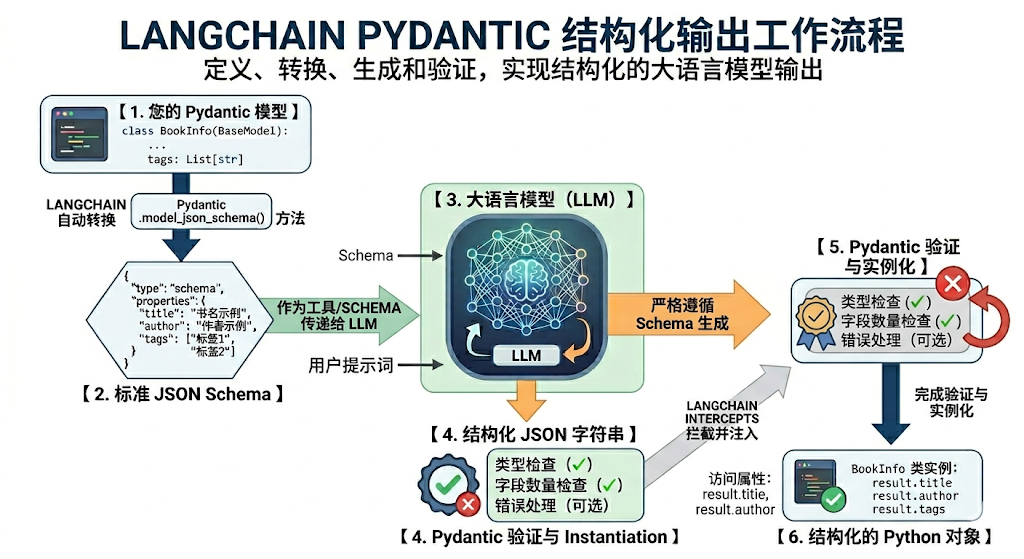
第1步:定义结构
比如:
from pydantic import BaseModel, Field
class BookInfo(BaseModel):
    title: str = Field(description="书名")
    author: str = Field(description="作者名字")
    tags: list[str] = Field(description="书籍的标签或分类")
第2步:协议转换
LangChain 内部会调用 Pydantic 的底层方法(如 model_json_schema() ),将你写的 Python 代码自动转换成标准的 JSON Schema。
这个 JSON Schema 是一段严格的 JSON 文本,详细描述了有哪些字段、字段类型是什么(string , array 等)以及字段的描述(description )。
第3步:模型交互与强约束
LangChain 会将这个 JSON Schema 包装进给大模型的 API 请求中。
现代方法(.with_structured_output ): 现代大模型(如 OpenAI、Anthropic、Gemini 等)普遍支持“函数调用/工具调用(Function/Tool Calling)”或“JSON Mode”。LangChain 会把 JSON Schema 作为 Tools 传入。
大模型侧的约束: 像 OpenAI 的 strict=True 参数,会启动模型的语法采样约束(Grammar- based sampling)。大模型在解码生成 token 时,不是瞎猜,而是严格按照 JSON Schema 的语法树进行选择,从而在模型底层级保证了输出格式绝不走样。
第4步:自动解析与验证
当大模型返回符合 JSON 规范的字符串后,LangChain 的 PydanticStructuredOutputParser (解析器)会接管工作:
- 解析(Parsing): 将字符串解析为 Python 字典。
- 验证(Validation): 将字典喂给你的 Pydantic 模型。Pydantic 会自动检查数据类型是否正确。
如果模型漏掉了必填字段,或者类型错误,这里会直接抛出验证错误(或者触发 LangChain 的重试机制)。
- 返回(Return): 如果通过验证,你拿到的不再是冷冰冰的字符串,而是一个直接可以点出属性的 Python Pydantic 对象(例如 result.title )。
2.2 模式2:TypedDict
2.2.1 什么是 TypedDict
TypedDict 是 Python 3.8+ 引入的一种类型提示工具,即带有类型声明的字典结构。适合需要快速定义字典结构且无需 Pydantic 重量级功能的场景。
1、普通 dict 没有类型信息:
{
    "title": "盗梦空间",
    "year": 2010,
    "director": "克里斯托弗·诺兰",
    "rating": 9.3
}
2、 TypedDict 可以进一步说明:
这个字典应该有哪些字段每个字段的类型是什么TypedDict 主要是类型声明,不是运行时强校验器。
举例:
from typing_extensions import TypedDict
class MovieDict(TypedDict):
    title: str
    year: int
    director: str
    rating: float
movie: MovieDict = {
    "title1": "盗梦空间",
    "year": 2010,
    "director": "克里斯托弗·诺兰",
    "rating": 8.8,
}
print(movie)
实例化字典时给出的字段名称和TypedDict不完全一致,此时IDE的静态类型检查会标记。
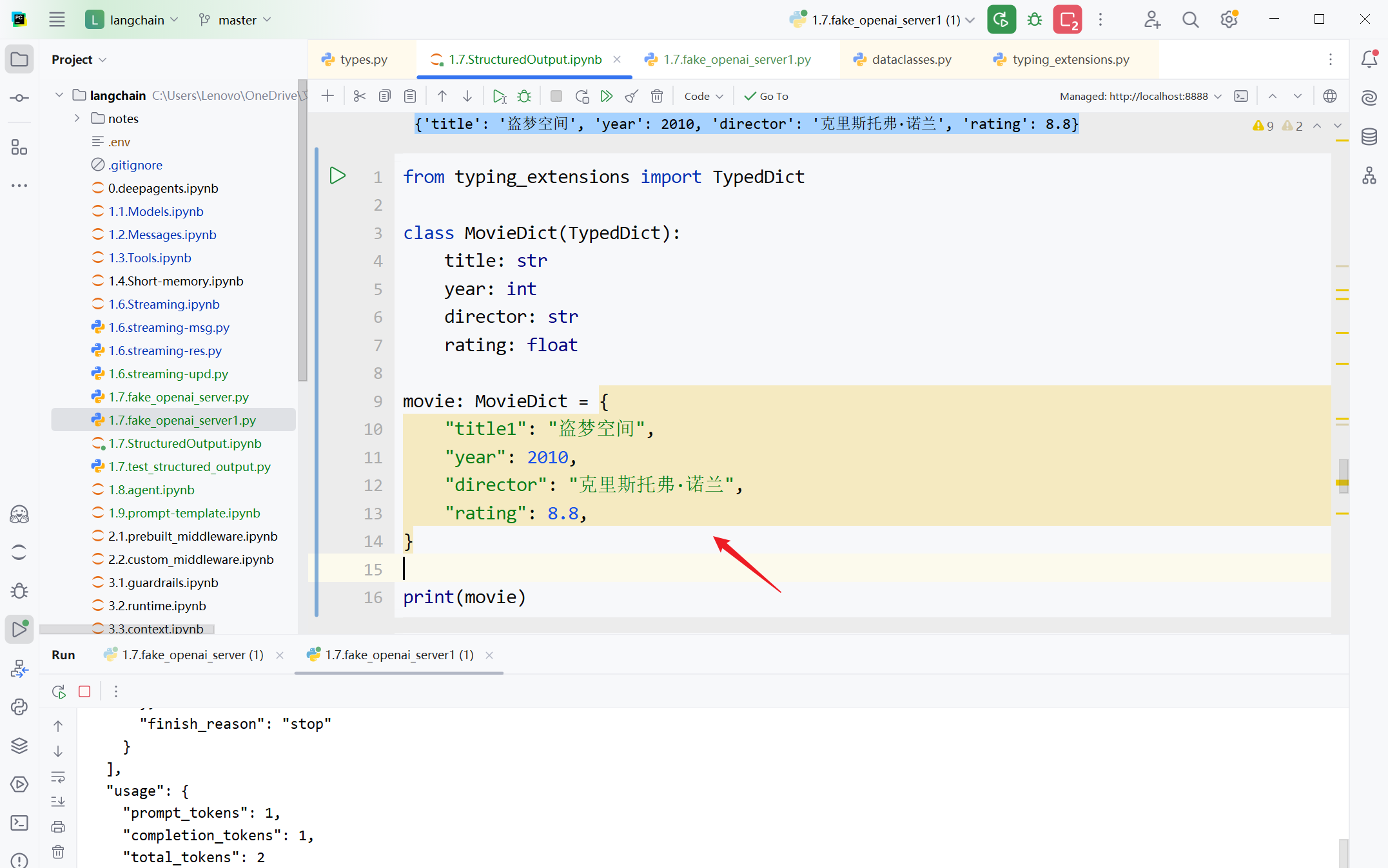
但不会导致运行时异常,输出如下所示
{
 'title1': '盗梦空间',
 'year': 2010,
 'director': '克里斯托弗·诺兰',
 'rating': 8.8
}
2.2.2 基本使用
Annotated的使用
Annotated 用来在“类型”之外,再附加一些额外信息,即元数据。类似于Pydantic 的Field 。
基本形式:
Annotated[类型, 附加信息1, 附加信息2, ...]
举例的前提:
使用CloseAI平台的gpt模型:
from langchain.chat_models import init_chat_model
from dotenv import load_dotenv
import os
# 从.env文件中加载环境变量
load_dotenv(override=True)
CLOSEAI_API_KEY = os.getenv("CLOSEAI_API_KEY")
CLOSEAI_BASE_URL = os.getenv("CLOSEAI_BASE_URL")
model_with_closeai = init_chat_model(
    model="gpt-5.4-mini",
    model_provider="openai",
    api_key=CLOSEAI_API_KEY,
    base_url=CLOSEAI_BASE_URL
)
使用OpenRouter平台的gpt模型:
from langchain_openrouter import ChatOpenRouter
from dotenv import load_dotenv
import os
load_dotenv(override=True)
OPENROUTER_API_KEY = os.getenv("OPENROUTER_API_KEY")
OPENROUTER_API_BASE = os.getenv("OPENROUTER_API_BASE")
model_with_openrouter = ChatOpenRouter(
    model="openai/gpt-5.4-mini",
    api_key=OPENROUTER_API_KEY,
    base_url=OPENROUTER_API_BASE,
)
举例1:返回简单结构
"""
使用 TypedDict 模型定义结构化输出
"""
from typing_extensions import TypedDict, Annotated
class MovieTypedDict(TypedDict):
    """
    电影的详细信息
    """
    title: Annotated[str, "电影的正式名称,例如《盗梦空间》"]
    year: Annotated[int, "电影的公映年份,使用四位数字表示"]
    director: Annotated[str, "电影导演的全名"]
    rating: Annotated[float, "电影在10分制下的评分,可包含一位小数"]
# 设置模型结构化输出
structured_llm  = model_with_closeai.with_structured_output(MovieTypedDict)
# 调用模型并获取结构化输出
response = structured_llm.invoke("给我介绍下电影《星际穿越》")
print(type(response))
print(response)
输出如下:
<class 'dict'>
{'title': '星际穿越', 'year': 2014, 'director': '克里斯托弗·诺兰', 'rating':
8.6}
举例2:返回嵌套结构
from typing import TypedDict, List, Annotated
# 使用TypedDict定义嵌套结构
class Actor(TypedDict):
    """演员情况"""
    name: Annotated[str, "演员姓名"]
    role: Annotated[str, "饰演的角色"]
class Movie(TypedDict):
    """电影情况"""
    title: Annotated[str, "电影标题"]
    year: Annotated[int, "上映年份"]
    director: Annotated[str, "导演"]
    cast: Annotated[List[Actor], "演员列表"]  # 嵌套列表定义
    rating: Annotated[float, "评分"]
# 设置模型结构化输出
structured_llm  = model_with_closeai.with_structured_output(Movie)
# 调用模型并获取结构化输出
resp = structured_llm.invoke("给我介绍下电影《盗梦空间》")
# 访问嵌套数据
print(f"电影名: {resp['title']}")
print(f"上映年份: {resp['year']}")
print(f"导演: {resp['director']}")
print(f"演员列表:{resp['cast']}")
print(f"评分: {resp['rating']}")
输出如下:
电影名: 盗梦空间
上映年份: 2010
导演: 克里斯托弗·诺兰
演员列表:[{'name': '莱昂纳多·迪卡普里奥', 'role': '多姆·柯布'}, {'name': '约瑟
夫·高登-莱维特', 'role': '亚瑟'}, {'name': '艾伦·佩吉', 'role': '阿里阿德涅'},
{'name': '汤姆·哈迪', 'role': '伊姆斯'}, {'name': '渡边谦', 'role': '斋藤'}]
评分: 8.8
举例3:...的使用
说明:与模型提供商有关系
使用CloseAI平台gpt模型:
from typing_extensions import TypedDict, Annotated
class MovieDict(TypedDict):
    """
    电影的详细信息
    """
    title: Annotated[str, ..., "电影标题"]
    year: Annotated[int, ..., "电影上映年份"]
    director: Annotated[str, ..., "导演"]
    rating: Annotated[float, ..., "电影评分,满分十分"]
model_with_structure = model_with_closeai.with_structured_output(MovieDict)
response = model_with_structure.invoke("根据这段话抽取盗梦空间的信息,不包含的信息
可以留空:盗梦空间在2010年上映,导演是克里斯托弗·诺兰。")
print(response)
print(type(response))
输出
{'title': '盗梦空间', 'year': 2010, 'director': '克里斯托弗·诺兰'}
<class 'dict'>
使用OpenRouter平台gpt模型:
from typing_extensions import TypedDict, Annotated
class MovieDict(TypedDict):
    """
    电影的详细信息
    """
    title: Annotated[str, ..., "电影标题"]
    year: Annotated[int, ..., "电影上映年份"]
    director: Annotated[str, ..., "导演"]
    rating: Annotated[float, ..., "电影评分,满分十分"]
model_with_structure =
model_with_openrouter.with_structured_output(MovieDict)
response = model_with_structure.invoke("根据这段话抽取盗梦空间的信息,不包含的信息
可以留空:盗梦空间在2010年上映,导演是克里斯托弗·诺兰。")
print(response)
print(type(response))
输出
{'title': '盗梦空间', 'year': 2010, 'director': '克里斯托弗·诺兰', 'rating':
0}
<class 'dict'>
说明:上述代码的... 是Python的字面量,等价于Ellipsis ,可以理解为占位符。下游框架(如LangChain)可以对... 作定制化处理,如LangChain中Annotated的... 表示当前字段是必须存在的,不可省略,用来指示模型的输出。
再比如:
from typing_extensions import TypedDict, Annotated
class MovieDict(TypedDict):
    """
    电影的详细信息
    """
    title: Annotated[str, ..., "电影标题"]
    year: Annotated[int, ..., "电影上映年份"]
    director: Annotated[str, Ellipsis, "导演"]
    rating: Annotated[float, "电影评分,满分十分"]
model_with_structure = model.with_structured_output(MovieDict)
response = model_with_structure.invoke("根据这段话抽取盗梦空间的信息,不包含的信息
必须留空:盗梦空间上映于2010年,我们并不知道它的导演是谁。")
print(response)
print(type(response))
输出
{'title': '盗梦空间', 'year': 2010, 'director': ''}
<class 'dict'>
director 和rating 的信息都是缺失的,但是前者被标记为必填,因此输出的字典包含该字段但是值为
空字符串,而rating 字段被省略了。
2.3 模式3:JSON Schema
这种方式需要按照JSON Schema规范拼接JSON字符串,比较繁琐,并且缺少校验机制。不推荐。
举例1:返回简单结构
模型初始化:
from langchain.chat_models import init_chat_model
from dotenv import load_dotenv
import os
# 从.env文件中加载环境变量
load_dotenv(override=True)
CLOSEAI_API_KEY = os.getenv("CLOSEAI_API_KEY")
CLOSEAI_BASE_URL = os.getenv("CLOSEAI_BASE_URL")
model = init_chat_model(
    model="gpt-5.4-mini",
    model_provider="openai",
    api_key=CLOSEAI_API_KEY,
    base_url=CLOSEAI_BASE_URL
)
json_schema = {
    "title": "Movie",
    "description": "A movie with details",
    "type": "object",
    "properties": {
        "title": {
            "type": "string",
            "description": "The title of the movie"
        },
        "year": {
            "type": "integer",
            "description": "The year the movie was released"
        },
        "director": {
            "type": "string",
            "description": "The director of the movie"
        },
        "rating": {
            "type": "number",
            "description": "The movie's rating out of 10"
        }
    },
    "required": ["title", "year", "director", "rating"]
}
structured_model = model.with_structured_output(
    json_schema,
    method="json_schema"
)
response = structured_model.invoke("给出盗梦空间的信息")
print(response)
print(type(response))
输出如下:
{'title': '盗梦空间', 'year': 2010, 'director': '克里斯托弗·诺兰', 'rating':
8.8}
<class 'dict'>
说明:
1、method:结构化输出的方式,但是否可用,依赖于模型供应商及Langchain适配器的具体实现。比如,DeepSeek模型服务不支持json_shema模式。
json_schema:使用模型供应商提供的专用结构化输出功能。
2、以上代码中定义json_schema的时候指定的title、description、type、properties、required是遵循 JSON Schema 规范的标准关键字,是固定写法。几个关键字的解释如下:
title :为整个 Schema 或特定属性提供一个人类可读的标题,不能是中文,用于提高可读性。
description :提供更详细的文字描述,说明 Schema 或属性的用途等,和 title一样,旨在帮助理
解。
type :定义当前数据节点必须是什么数据类型。常见类型有 string, number, integer, boolean,
object, array, null。object即是json对象。
properties :用于定义JSON 对象(Object)中可以包含哪些属性(键),以及每个属性对应的值
类型和说明。
required :当 type为 "object"时使用,是一个数组,列出了对象中必须存在的属性名。
举例2:返回嵌套结构
"""
使用 JSON Schema 定义嵌套结构
"""
# 1. 定义嵌套的 JSON Schema
project_schema = {
    "title": "MovieInfo",
    "description": "包含电影标题、上映年份、导演、演员和评分的电影对象",
    "type": "object",
    "properties": {
        "title": {"type": "string", "description": "电影标题"},
        "year": {"type": "integer", "description": "上映年份"},
        "director": {"type": "string", "description": "导演"},
        "cast": {  # 定义嵌套数组
            "type": "array",
            "description": "演员列表",
            "items": {
                "type": "object",
                "properties": {
                    "name": {"type": "string", "description": "演员姓名"},
                    "role": {"type": "string", "description": "演员角色"}
                },
                "required": ["name", "role"]
            }
        },
        "rating": {"type": "number", "description": "评分(10分制)"}
    },
    "required": ["title", "year", "director", "cast", "rating"]
}
# 绑定 JSON Schema 到模型
structured_model = model.with_structured_output(project_schema)
# 调用模型
response = structured_model.invoke("生成一个关于《星际穿越》的电影信息,包含导演、演
员、评分")
print(response)
输出如下:
{
    'title': '星际穿越',
    'year': 2014,
    'director': '克里斯托弗·诺兰',
    'rating': 8.6,
    'cast': [{
        'name': '马修·麦康纳',
        'role': '库珀'
    }, {
        'name': '安妮·海瑟薇',
        'role': '艾米莉亚·布兰德'
    }, {
        'name': '杰西卡·查斯坦',
        'role': '墨菲·库珀(成年)'
    }, {
        'name': '迈克尔·凯恩',
        'role': '布兰德教授'
    }, {
        'name': '马特·达蒙',
        'role': '曼恩博士'
    }, {
        'name': '麦肯吉·弗依',
        'role': '墨菲·库珀(10岁)'
    }, {
        'name': '蒂莫西·柴勒梅德',
        'role': '汤姆·库珀(15岁)'
    }, {
        'name': '卡西·阿弗莱克',
        'role': '汤姆·库珀(成年)'
    }]
}
2.4 模式4:@dataclass
@dataclass是 Python 标准库 dataclasses 提供的类装饰器,用于简化“以字段为核心”的数据类定义。
给类加上 @dataclass 后,Python 会根据字段声明自动生成常用方法,例如:
init repr eq
因此,从对象行为上看,@dataclass 创建的类,常常近似于手写这些方法的普通类。
from dataclasses import dataclass
@dataclass
class Movie:
    title: str
    year: int
    director: str
    rating: float
这类写法的主要价值是:让“数据结构定义”更简洁、更清晰。
注意:
虽然 @dataclass 在行为上接近于手写 init 、repr 、eq 的普通类,但二者并不完全等价。@dataclass 修饰后的类仍然是普通的python类,但它会被标准库标记为数据类,并携带dataclass的字段元信息,手写__init__ 等方法的普通类不能替代@dataclass修饰的类。
前者可以作为Langchain的Schema,而后者不行。
举例:
模型的初始化:
from langchain.chat_models import init_chat_model
from dotenv import load_dotenv
import os
# 从.env文件中加载环境变量
load_dotenv(override=True)
CLOSEAI_API_KEY = os.getenv("CLOSEAI_API_KEY")
CLOSEAI_BASE_URL = os.getenv("CLOSEAI_BASE_URL")
model = init_chat_model(
    model="gpt-5.4-mini",
    model_provider="openai",
    api_key=CLOSEAI_API_KEY,
    base_url=CLOSEAI_BASE_URL
)
from dataclasses import dataclass
from pydantic import Field
@dataclass
class Movie():
    """
    电影的详细信息
    """
    title: str = Field(description="电影标题")
    year: int = Field(description="电影上映年份")
    director: str = Field(description="导演")
    rating: float = Field(description="电影评分,满分十分")
structured_model = model.with_structured_output(Movie)
response = structured_model.invoke("给出盗梦空间的信息")
print(response)
print(type(response))
输出
{'title': '盗梦空间', 'year': 2010, 'director': '克里斯托弗·诺兰', 'rating': 8.8}
<class 'dict'>
@dataclass作为schema,返回的是未经校验的字典。
3、关于类型校验
验证不同schema定义方式在数据格式不匹配时的处理方式。
3.1 fake server
我们构造一个虚拟的DeepSeek服务端,客户端接收到的响应是人为构造的,主要目的是为了观察不同模式下LangChain会从响应中的哪些字段中抽取信息。
服务器端如下:
import json
import time
from http.server import BaseHTTPRequestHandler, HTTPServer
class FakeDeepSeekHandler(BaseHTTPRequestHandler):
    def do_POST(self):
        content_length = int(self.headers.get("Content-Length", 0))
        raw_body = self.rfile.read(content_length).decode("utf-8")
        print("\n" + "=" * 100)
        json_body = None
        try:
            json_body = json.loads(raw_body)
            print("[JSON BODY]")
            print(json.dumps(json_body, ensure_ascii=False, indent=2))
        except Exception as e:
            print("[JSON PARSE ERROR]")
            print(repr(e))
        # 固定返回一个普通 JSON 字符串
        response = {
            "id": "chatcmpl-test",
            "object": "chat.completion",
            "created": int(time.time()),
            "model": "any",
            "choices": [
                {
                    "index": 0,
                    "message": {
                        "role": "assistant",
                        "content": "",
                        "tool_calls": [
                            {
                                "id": "call_1",
                                "type": "function",
                                "function": {
                                    "name": json_body["tools"][0]
["function"]["name"],
                                    "arguments": json.dumps(
                                        {'title1': '盗梦空间', 'year2': 2010,
'director': '克里斯托弗·诺兰',
                                         'rating': 9.3},
                                        ensure_ascii=False
                                    )
                                }
                            }
                        ]
                    },
                    "finish_reason": "stop"
                }
            ],
            "usage": {
                "prompt_tokens": 1,
                "completion_tokens": 1,
                "total_tokens": 2
            }
        }
        print("\n" + "=" * 100)
        print("[RESPONSE]")
        print(json.dumps(response, ensure_ascii=False, indent=2))
        body = json.dumps(response, ensure_ascii=False).encode("utf-8")
        self.send_response(200)
        self.send_header("Content-Type", "application/json; charset=utf-8")
        self.send_header("Content-Length", str(len(body)))
        self.end_headers()
        self.wfile.write(body)
    def log_message(self, format, *args):
        pass
def main():
    server = HTTPServer(("127.0.0.1", 8889), FakeDeepSeekHandler)
    print("Fake DeepSeek server running at http://127.0.0.1:8889")
    server.serve_forever()
if __name__ == "__main__":
    main()
不必关注代码实现,只需要知道我们返回的核心内容是
{
 'title1': '盗梦空间',
 'year2': 2010,
 'director': '克里斯托弗·诺兰',
 'rating': 9.3
}
LangChain客户端希望模型返回的是
{
    'title': 'xxx',
    'year': xxxx,
    'director': 'xxx',
    'rating': xxx
}
这里的前两个字段不匹配。
启动服务端,然后执行四种定义方式的客户端代码
3.2 四种模式的校验
3.2.1 Pydantic
from pydantic import BaseModel, Field, SecretStr
from langchain_deepseek import ChatDeepSeek
model = ChatDeepSeek(
    model="deepseek-v4-flash",
    api_base="http://localhost:8889",
    api_key=SecretStr("<KEY>")
)
class MovieModel(BaseModel):
    """
    电影的详细信息
    """
    title: str = Field(description="电影标题")
    year: int = Field(description="电影上映年份")
    director: str = Field(description="导演")
    rating: float = Field(description="电影评分,满分十分")
model_with_structure = model.with_structured_output(MovieModel)
response = model_with_structure.invoke("给出盗梦空间的信息")
print(response)
print(type(response))
输出
Traceback...
ValidationError: 2 validation errors for MovieModel
title
Field required [type=missing, input_value={'title1': '盗梦空间'...诺兰',
'rating': 9.3}, input_type=dict]
For further information visit https://errors.pydantic.dev/2.12/v/missing
year
Field required [type=missing, input_value={'title1': '盗梦空间'...诺兰',
'rating': 9.3}, input_type=dict]
For further information visit https://errors.pydantic.dev/2.12/v/missing
因为title 和year 字段不匹配抛出异常。
3.2.2 TypedDict
from typing_extensions import TypedDict, Annotated
from langchain_deepseek import ChatDeepSeek
model = ChatDeepSeek(
    model="deepseek-v4-flash",
    api_base="http://localhost:8889",
    api_key=SecretStr("<KEY>")
)
class MovieDict(TypedDict):
    """
    电影的详细信息
    """
    title: Annotated[str,"电影标题"]
    year: Annotated[int,"电影上映年份"]
    director: Annotated[str,"导演"]
    rating: Annotated[float,"电影评分,满分十分"]
structured_model = model.with_structured_output(MovieDict)
response = structured_model.invoke("给出盗梦空间的信息")
print(response)
print(type(response))
输出
{'title1': '盗梦空间', 'year2': 2010, 'director': '克里斯托弗·诺兰',
'rating': 9.3}
<class 'dict'>
按照字典形式输出,不报错。
3.2.3 JSON schema
from langchain_deepseek import ChatDeepSeek
model = ChatDeepSeek(
    model="deepseek-v4-flash",
    api_base="http://localhost:8889",
    api_key=SecretStr("<KEY>")
)
json_schema = {
    "title": "Movie",
    "description": "A movie with details",
    "type": "object",
    "properties": {
        "title": {
            "type": "string",
            "description": "The title of the movie"
        },
        "year": {
            "type": "integer",
            "description": "The year the movie was released"
        },
        "director": {
            "type": "string",
            "description": "The director of the movie"
        },
        "rating": {
            "type": "number",
            "description": "The movie's rating out of 10"
        }
    },
    "required": ["title", "year", "director", "rating"]
}
structured_model = model.with_structured_output(
    json_schema,
    method="json_schema"
)
response = structured_model.invoke("给出盗梦空间的信息")
print(response)
print(type(response))
输出如下
{'title1': '盗梦空间', 'year2': 2010, 'director': '克里斯托弗·诺兰',
'rating': 9.3}
<class 'dict'>
按照字典形式输出,不报错。
3.3.4 @dataclass
from dataclasses import dataclass
from langchain_deepseek import ChatDeepSeek
model = ChatDeepSeek(
    model="deepseek-v4-flash",
    api_base="http://localhost:8889",
    api_key=SecretStr("<KEY>")
)
@dataclass
class Movie():
    """
    电影的详细信息
    """
    title: str = Field(description="电影标题")
    year: int = Field(description="电影上映年份")
    director: str = Field(description="导演")
    rating: float = Field(description="电影评分,满分十分")
structured_model = model.with_structured_output(Movie)
response = structured_model.invoke("给出盗梦空间的信息")
print(response)
print(type(response))
输出如下
{'title1': '盗梦空间', 'year2': 2010, 'director': '克里斯托弗·诺兰',
'rating': 9.3}
<class 'dict'>
按照字典形式输出,不报错。
3.2.5 小 结
用Pydantic定义schema,在接收到响应后会进行校验,字段不匹配则抛出异常,其余三种方式不校验。
4、获取结构化结果方式
以上定义输出结构的四种模式中,我们都是通过调用“with_structured_output”来获取结构化输出结果,除了这种方式外,还可以通过使用输出解释器来获取结构化输出结果。下面介绍这两种获取结构化结果的方式。
4.1 使用with_structured_output
这种方式是最新、最简洁的API,直接让模型“理解”你需要的数据结构,并返回解析好的对象。
此外,我们可以在with_structured_output方法中传入include_raw=True 参数,表示返回解析前的原始AIMessage ,从而访问令牌用量等元数据。
举例:
from langchain.chat_models import init_chat_model
from dotenv import load_dotenv
import os
# 从.env文件中加载环境变量
load_dotenv(override=True)
CLOSEAI_API_KEY = os.getenv("CLOSEAI_API_KEY")
CLOSEAI_BASE_URL = os.getenv("CLOSEAI_BASE_URL")
model = init_chat_model(
    model="gpt-5.4-mini",
    model_provider="openai",
    api_key=CLOSEAI_API_KEY,
    base_url=CLOSEAI_BASE_URL
)
from pydantic import BaseModel, Field
from rich import print as rprint
class Movie(BaseModel):
    """电影信息"""
    title: str = Field(description="电影标题")
    year: int = Field(description="上映年份")
    director: str = Field(description="导演")
    rating: float = Field(description="评分(10分制)")
# 设置模型结构化输出
model_with_structure  = model.with_structured_output(Movie,include_raw=True)
# 调用模型并获取结构化输出
resp = model_with_structure.invoke("给我介绍下电影《星际穿越》")
print(type(resp))
rprint(resp)
以上代码运行结果如下:
<class 'dict'>
{
    'raw': AIMessage(content = '', additional_kwargs = {
        'refusal': None
    }, response_metadata = {
        'token_usage': {
            'completion_tokens': 93,
            'prompt_tokens': 373,
            'total_tokens': 466,
            'completion_tokens_details': None,
            'prompt_tokens_details': {
                'audio_tokens': None,
                'cached_tokens': 320
            },
            'prompt_cache_hit_tokens': 320,
            'prompt_cache_miss_tokens': 53
        },
        'model_provider': 'deepseek',
        'model_name': 'deepseek-chat',
        'system_fingerprint': 'fp_eaab8d114b_prod0820_fp8_kvcache',
        'id': '679228cd-956f-49bf-85b5-38ec684baca3',
        'finish_reason': 'tool_calls',
        'logprobs': None
    }, id = 'lc_run--019bbc7f-2c63-7611-a2e6-c413c2d11e52-0',
tool_calls = [{
        'name': 'Movie',
        'args': {
            'title': '星际穿越',
            'year': 2014,
            'director': '克里斯托弗·诺兰',
            'rating': 9.3
        },
        'id': 'call_00_WCnHeO1OYKS1gjuJfvmB1QHz',
        'type': 'tool_call'
    }], invalid_tool_calls = [], usage_metadata = {
        'input_tokens': 373,
        'output_tokens': 93,
        'total_tokens': 466,
        'input_token_details': {
            'cache_read': 320
        },
        'output_token_details': {}
    }),
    'parsed': Movie(title = '星际穿越', year = 2014, director = '克里斯托
弗·诺兰', rating = 9.3),
    'parsing_error': None
}
输出包含了完整的输出响应,包含三个字段
raw:返回的原始AIMessage。
parsed:解析后的输出parsing_error:解析错误,当前用的是Pydantic,校验,格式不符合schema会导致报错。其它三种方式不符合schema不会导致报错。
4.2 使用输出解析器(不推荐)
这种方法更传统,依赖于在提示词中明确指示模型输出特定格式的文本,然后使用解析器进行转换。
其流程是:提示词指导 (引导生成指定类型)→ 模型生成文本 → 解析器转换。
举例:
from langchain_core.output_parsers import JsonOutputParser
from langchain_core.prompts import ChatPromptTemplate
from pydantic import BaseModel, Field
from langchain.chat_models import init_chat_model
from dotenv import load_dotenv
import os
# 1. 创建提示词模板
prompt_template = ChatPromptTemplate.from_messages([
    ("system","回答用户问题,必须始终输出一个包含title(电影标题)和year(上映年份)的
JSON 对象"),
    ("human","问题:{question}")
])
# 2. 模型初始化
# 从.env文件中加载环境变量
load_dotenv(override=True)
model = init_chat_model(
    model="gpt-5.4-mini",
    model_provider="openai",
    api_key=os.getenv("CLOSEAI_API_KEY"),
    base_url=os.getenv("CLOSEAI_BASE_URL")
)
# 3. 定义结构
class Movie(BaseModel):
    """电影信息"""
    title: str = Field(description="电影标题")
    year: int = Field(description="上映年份")
# 4. 创建输出解析器
parser = JsonOutputParser(pydantic_object=Movie)
# 5. 创建链
chain = prompt_template | model | parser
# 6. 调用(返回字典)
response = chain.invoke({"question": "介绍电影《盗梦空间》"})
#
# response =
parser.invoke(model.invoke(prompt_template.invoke({"question":"介绍电影《盗梦空
间》"})))
print(response)
{'title': '盗梦空间', 'year': 2010}